



cBrain F2 Clearning ist direkt in cBrain F2 verfügbar, sodass Sie immer nur ein paar Klicks davon entfernt sind, cBrain F2 auf eigene Faust kennenzulernen. Sie werden in der Lage sein, Wissen über die Funktionen in cBrain F2 zu finden und abzurufen, wann immer Sie es benötigen. cBrain F2 Clearning kann sowohl bestehende cBrain F2-Benutzer unterstützen als auch bei der Schulung neuer Benutzer helfen.
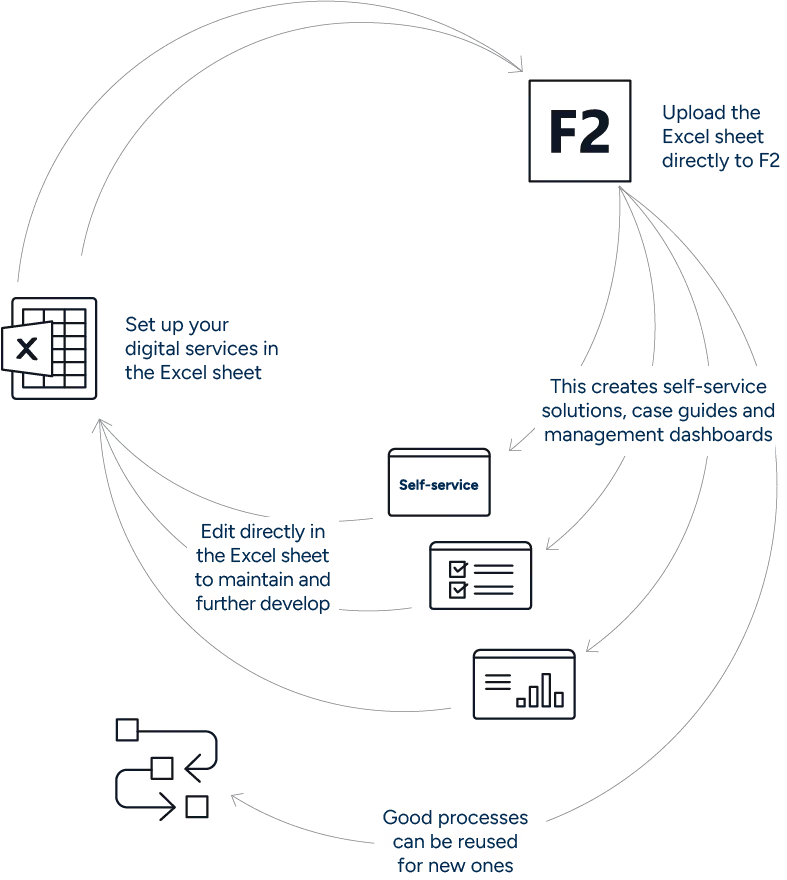
F2 Service Builder enables organizations to create and maintain digital case processes in F2 by working with a design template.
A process can include case guides, self-service forms, document generation, email templates, receipts, calculations, and management dashboards, depending on how F2 Service Builder is configured in your F2 installation.
This makes it possible to standardize recurring processes, reduce manual work, and make it easier for teams to build on existing process designs instead of starting from scratch every time.

This resource area is primarily for:
If you are a business unit preparing for a workshop, you can also use the checklists and examples to describe your process before the configuration work begins.
F2 Service Builder is especially relevant when a process is repeated often, needs to follow a consistent structure, or requires better overview and documentation.
Typical use cases include:
F2 Service Builder can also be useful for low-volume processes if the process is high-risk, requires strong documentation, or must be handled in a consistent way.
A successful F2 Service Builder process starts with a clear understanding of the process you want to build.
Before opening the design template, clarify:

Start by checking whether the process is suitable for F2 Service Builder. Look at volume, risk, complexity, need for standardization, reporting needs, and whether the process can be handled with the available F2 Service Builder functionality.

Work with the business unit to describe the current process and the desired future process. Focus on phases, tasks, roles, decisions, documents, and data.

Many processes share the same basic structure. Before building from scratch, check whether there is a template or example you can reuse and adapt.
[Browse templates and examples]

Most processes improve through several iterations. Build a first version, test it with the relevant users, adjust it, and make sure responsibilities are clear before the process is put into production.

When you need detailed instructions on the design template, self-service setup, case guides, calculation sheets, upload, or testing, go to the F2 Service Builder manual in F2 Docs.

This customer portal area gives you practical resources that complement the full product manual:
If you are missing a template, have an idea for a guide, or want to share how your organization uses F2 Service Builder, we would like to hear from you.
[Share feedback] [Suggest a template] [Share a case]


